- Nerd Out on Notion
- Posts
- Notion finally did it


Hey,
Notion just released archives, which solves a problem most people have had for years. Tabs clean up how you structure pages, and there are a few simple keyboard things that make everything feel way faster once you start using them.
Here are the ones worth knowing.
- Nick
In Today's Email 👀
A better way to clean up your Notion workspace
Clear sections without nesting everything
Move way faster without your mouse
3 Tips / Updates
1/ ARCHIVE IS HERE
Finally, a middle ground between hoarding and deleting.
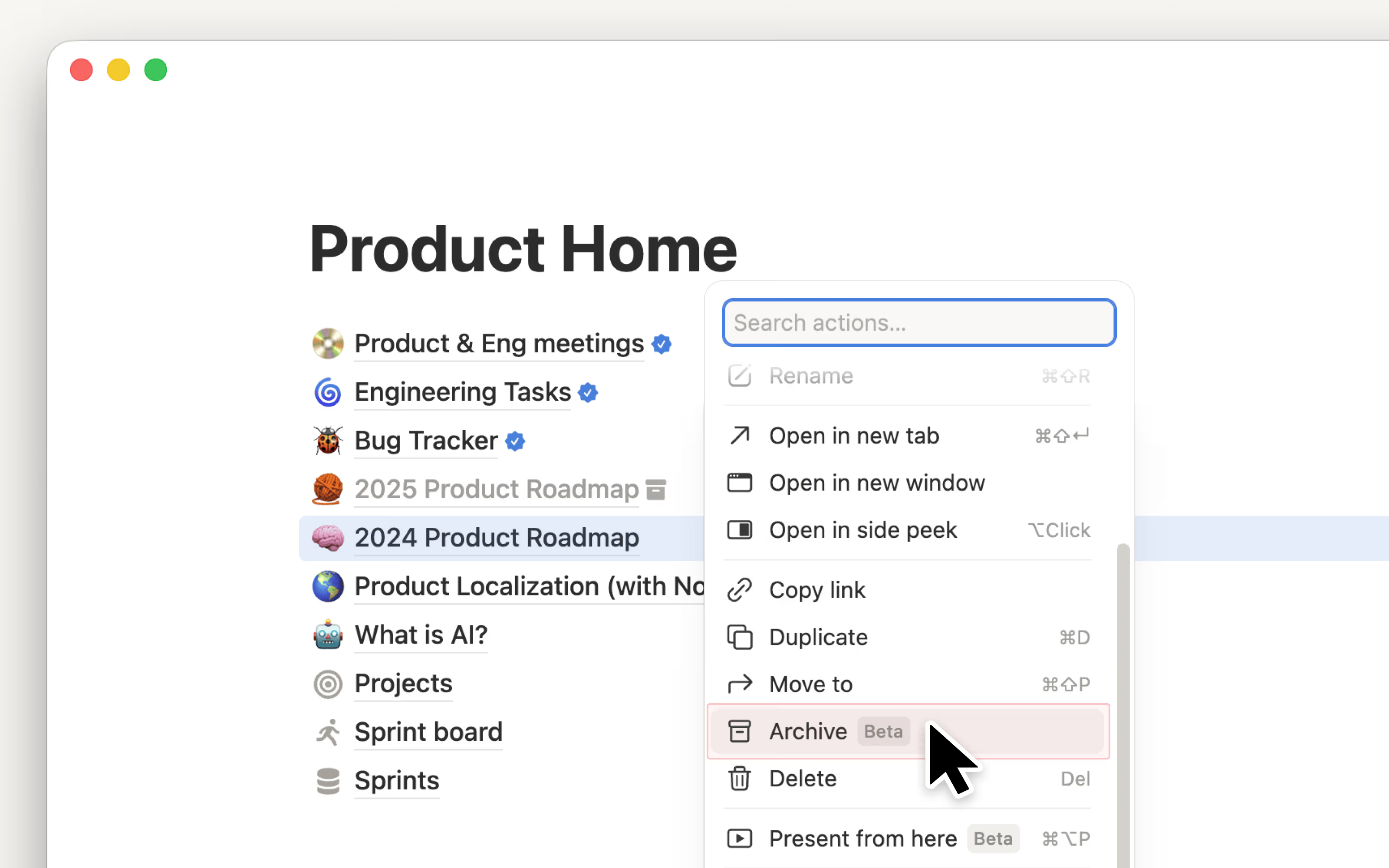
Notion dropped the Archive feature on March 27, and it’s wild this wasn’t a thing already. You can mark any page as archived and it instantly disappears from your search results, sidebar, and database views without being deleted permanently.
If you've been using Notion for 6+ months, your workspace is almost certainly full of old project pages, abandoned experiments, and "someday maybe" pages that you'll never touch again. They clog your search, bloat your sidebar, and make everything harder to find. Deleting felt too permanent. Now you don't have to choose.
One thing to know: there's no dedicated Archive section in the sidebar like there is for Trash. It's more of a flagging system, archived pages are hidden but recoverable. You can still find them if you need to, you just have to look.
I suggest auditing anything you haven't touched in 6+ months. Create an All Pages database view filtered by Last Edited before a certain date to surface candidates fast. Then archive ruthlessly.
2/ TABS: THE BLOCK NOTION'S OWN ENGINEERS KEPT INTERNAL FOR YEARS
Type /tabs. You can add what seems to be a endless amount of tabs into it surprisingly. Changing the names of the tabs can be done by simply right clicking on them.

For anyone willing to push the limits of the max number of tabs past what we did, I think it would be an interesting project. This will be very useful especially for those of us who find themselves with Notion pages that seem to have endless toggles lists across it.
Notion shipped this yesterday. You can now split a page into sections without creating a bunch of nested pages. Apparently they’ve been using this internally for years.
The main shift is simple. You don’t need subpages and toggles for everything anymore. Less clicking around. Easier to navigate. Less chance of people getting lost.
If you’ve ever sent someone a Notion page and they couldn’t find anything, this helps.
3/ HOW TO DITCH THE MOUSE
If you want to move faster in Notion, stay on your keyboard. Here are a few tips.
Use # + space for headings* + space for bullet points" + space for quotesShift + > + space for toggles
If you get stuck in a toggle, hit Enter, then Shift + Tab to get out.
Hit Escape to move between blocks without clicking.
If you want to change a block, just type /turn After it, switch it to whatever you need.
TEMPLATES THAT JUST WORK

Reset. Refocus. Reorganize. Access premium systems that streamline your work and life.
Templates for freelancers, founders, students & beyond.
From Money Tracker to Second Brain, get systems that just work.
Quick Links & Tools
Your goals should be treated as ‘projects’. Once you link them to tasks, you actually start making progress instead of just staring at a list. Simple shift, but it changes how you work. Worth stealing.
If your Notion feels messy or disconnected, Georgina shows how to organize everything using databases, relations, rollups, formulas, timelines, sync blocks, and comments, all working together.
What did you think about this newsletter? |
Reply