- Nerd Out on Notion
- Posts
- Notion spent $140k on... this
Notion spent $140k on... this
Meeting notes, self-reviews, and a street sign

Nick Horob
April 14, 2026

Hey,
Notion had a busy week and not just inside the app.
New covers, meeting notes being used in ways nobody expected, self-reviews that write themselves, and a $140k decision that's either genius or madness. Probably both.
Let's get into it.
- Nick
In Today's Email 👀
Meeting notes → not just for meetings
New Notion covers (these are actually nice)
Self-reviews → auto summaries from your work
$140k Notion street sign (worth it?)
3 quick tools + setup ideas
3 Tips / Updates
1/ MEETING NOTES, BUT NOT FOR MEETINGS
Most people use Notion AI Meeting Notes for Zoom calls. That's the smallest possible use of it..
This week a post blew up with people sharing what else they're using it for. Someone is recording house viewings as they walk through properties, the AI pulls context from their house database (price, location, notes they've made) and builds summaries that actually make sense.
Others use it for brain dumps in the car, post-training reflections after a workout, and phone calls with customer service so they don't have to scribble anything down.
The thing that makes it useful isn't the transcription. It's that Notion AI knows what's already in your workspace. A meeting note about a house links to the house page. A call about a project links to the project.
Type /meeting notes on any page to start. You don't need a scheduled meeting. You just need something worth capturing.
2/ NOTION JUST GOT A LOT PRETTIER
Four new page cover collections dropped this week from museums and public archives.
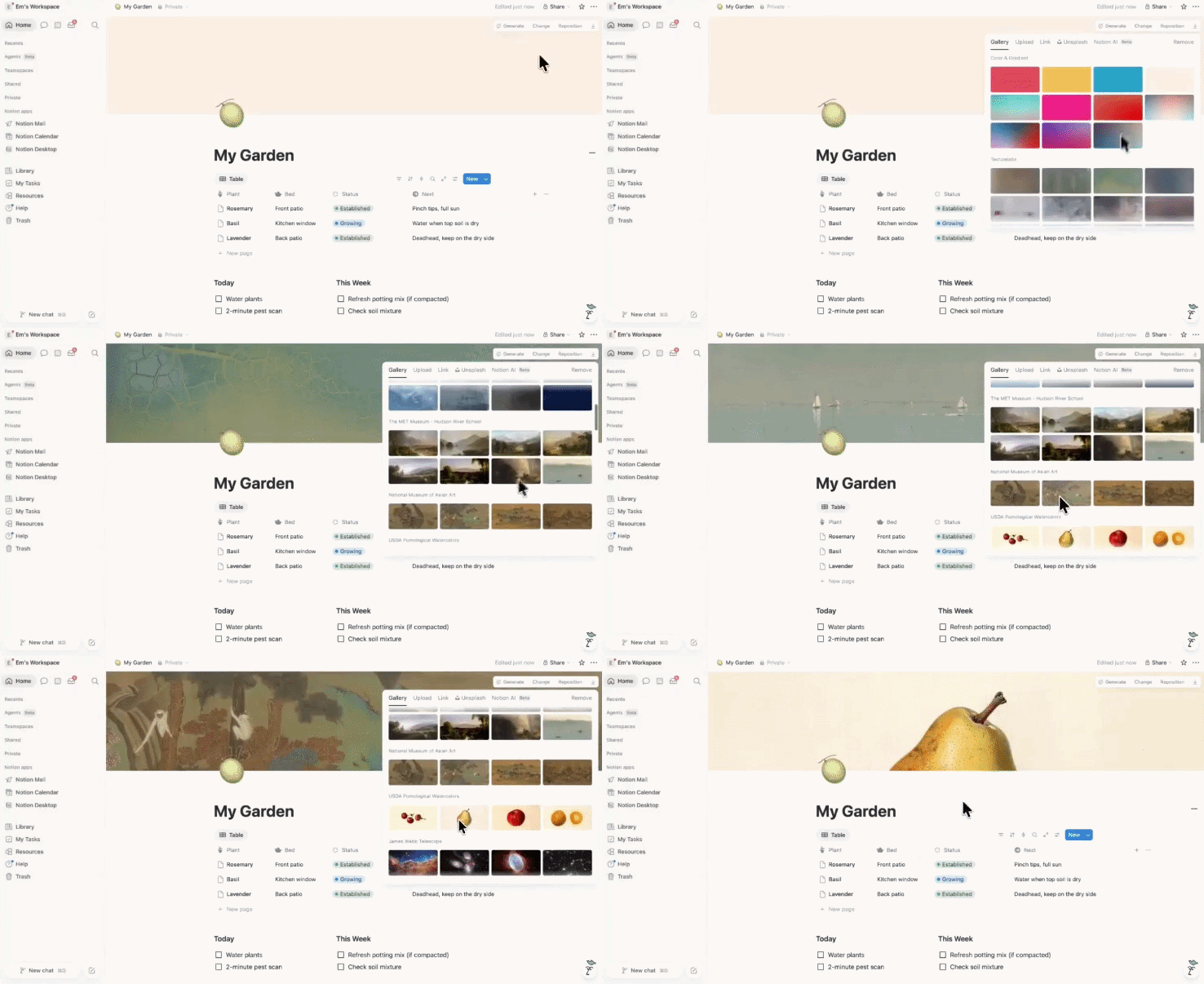
Hudson River School paintings from The Met. Chinese silk paintings from the National Museum of Asian Art. Watercolor fruits from the USDA Pomological Watercolors collection. Natural textures from Texturelabs.
It sounds minor but the USDA watercolor fruits in particular are genuinely cool. The kind of thing that makes you want to redesign your whole workspace on a Sunday afternoon.
Open any page → click cover → find new collections in the art gallery section.
3/ SELF-REVIEWS ARE UNDERRATED
At first this just looks like a performance review feature. Click a button → it generates a summary of your work.. But if you’ve been using Notion properly, it’s actually way more useful than that.
It pulls from your notes, projects, and past work and stitches everything together into something readable. Which means it works really well for things like:
weekly updates
team reports
or even client summaries
Instead of sitting down and writing everything from scratch, you just repurposing what you’ve already done.
The catch is it depends on how your workspace is set up. If everything is scattered or half-filled, the output isn’t great. If your work is tracked properly, it saves a lot of time. (That’s basically how most second brain setups are structured.)
Meeting notes, project updates, decisions, outcomes. It’s all there already.
So when you need a summary, you’re just pulling from what you’ve already done.
Poll/ The $140,000 Street Sign
A group of three guys bought a foreclosed, unnamed alley in San Francisco and auctioned off the naming rights to fund a community mural project where anyone on the internet could submit art to be painted on the street.
Notion won with a $140,000 bid..

The alley is now officially "The Notion Way" on the map, on a real street sign, permanently.
A few things worth noting:
→ 43 bids were placed (WordPress Way, Gum Road, DoNotPay Boulevard)
→ The money goes toward public art, not profit
→ Notion gets a real-world brand moment for less than a billboard campaign
Was this $140k well spent? |
TEMPLATES THAT JUST WORK

Reset. Refocus. Reorganize. Access premium systems that streamline your work and life.
Templates for freelancers, founders, students & beyond.
From Money Tracker to Second Brain, get systems that just work.
Quick Links & Tools
TAB DISPLAY OPTIONS FOR DATABASES: Small but useful. You can now choose how tabs display in your databases. Text and icon. Text only. Icon only. Find it by clicking on any database tab and looking for the display options. See the release →
A NOTION AGENT ANSWERING SLACK QUESTIONS: Someone asked their agent in Slack for an episode update. It replied with a full 4-week schedule from Notion. No prompting, no tab switching. See how it works →
STOP OVERBUILDING YOUR NOTION SETUP: People are spending more time organising Notion than actually doing work. Best advice: capture first, organise later. Keep it simple. If everything ends up in one page… that might just be how you work. See discussion →
Reply