- Nerd Out on Notion
- Posts
- The dashboard update we needed
The dashboard update we needed
stop clicking through a dozen different pages

Nick Horob
March 17, 2026

Hey,
There is a big difference between just storing your work and actually managing it. For a long time, building a true command center in Notion meant clicking through a dozen different pages just to figure out what your team was doing.
Not anymore.
With the release of the new Dashboard View, you can finally put all your most important databases on a single glass pane. Add in the fact that people are now building autonomous AI agents right inside their workspaces, and the line between your software and your actual team is getting very blurry.
Let's dive into it.
-Nick
In Today’s Email 👀
Notion's New Dashboard View
Building an AI Chief of Staff
Enforced AI Meeting Consent
Quick Links & Tools
3 Tips / Updates
1/ THE NEW DASHBOARD VIEW
Notion just released a Dashboard View that lets you combine multiple database views into one single screen. Instead of switching between different pages, you can now create a centralized control center for your entire workspace.

The biggest unlock here is that you are no longer restricted to viewing data from a single database. You can pull in linked views from completely separate databases (like your Tasks database and your Client Projects database) and stack them side by side in the same dashboard window. Crucially, the dashboard fully respects your existing permission structures. If a contractor only has access to the Projects database, the Tasks module on their dashboard will simply show up as restricted.
Here are a few ways teams are already leveraging it:
Team performance tracking: View open tasks by assignee, overdue work, and completion percentages side by side.
Agency time tracking: Monitor time spent per client and compare estimated versus actual hours to spot unprofitable projects quickly.
Lightweight CRM: Combine charts and pipeline views to instantly see expected revenue, win rates, and lead sources. (Notion also just added "Number Charts," so you can prominently display big metrics like "Closed Deals This Year" directly on your dashboard).
Workspace health checks: Build an admin panel that automatically flags tasks without assignees, tasks missing time estimates, or items without due dates so your project manager can clear the inbox every Monday morning.
2/ BUILDING AN AI CHIEF OF STAFF
One creator recently documented how he spent a week setting up an AI agent to work alongside him inside Notion. Not as a chatbot, but as an actual team member.
He gave the AI its own workspace with tasks and documents. When something changes in Notion, like a task moving to "ready," a webhook notifies the agent. The agent wakes up, executes the work via the API, and pushes the results back. It can even create research requests for other agents, wait for them to finish, and compile the final output.
One example from his setup demo was a workflow that automatically turns YouTube transcripts into formatted blog posts and publishes them directly to WordPress. The real insight here is the mindset shift. Stop asking AI to complete isolated tasks and start using it to build systems that run without you.
3/ WORKSPACE-WIDE CONSENT POLICIES
If your team relies on Notion's AI Meeting Notes, workspace owners finally have better compliance controls. You can now enforce a workspace-wide policy for audio consent.
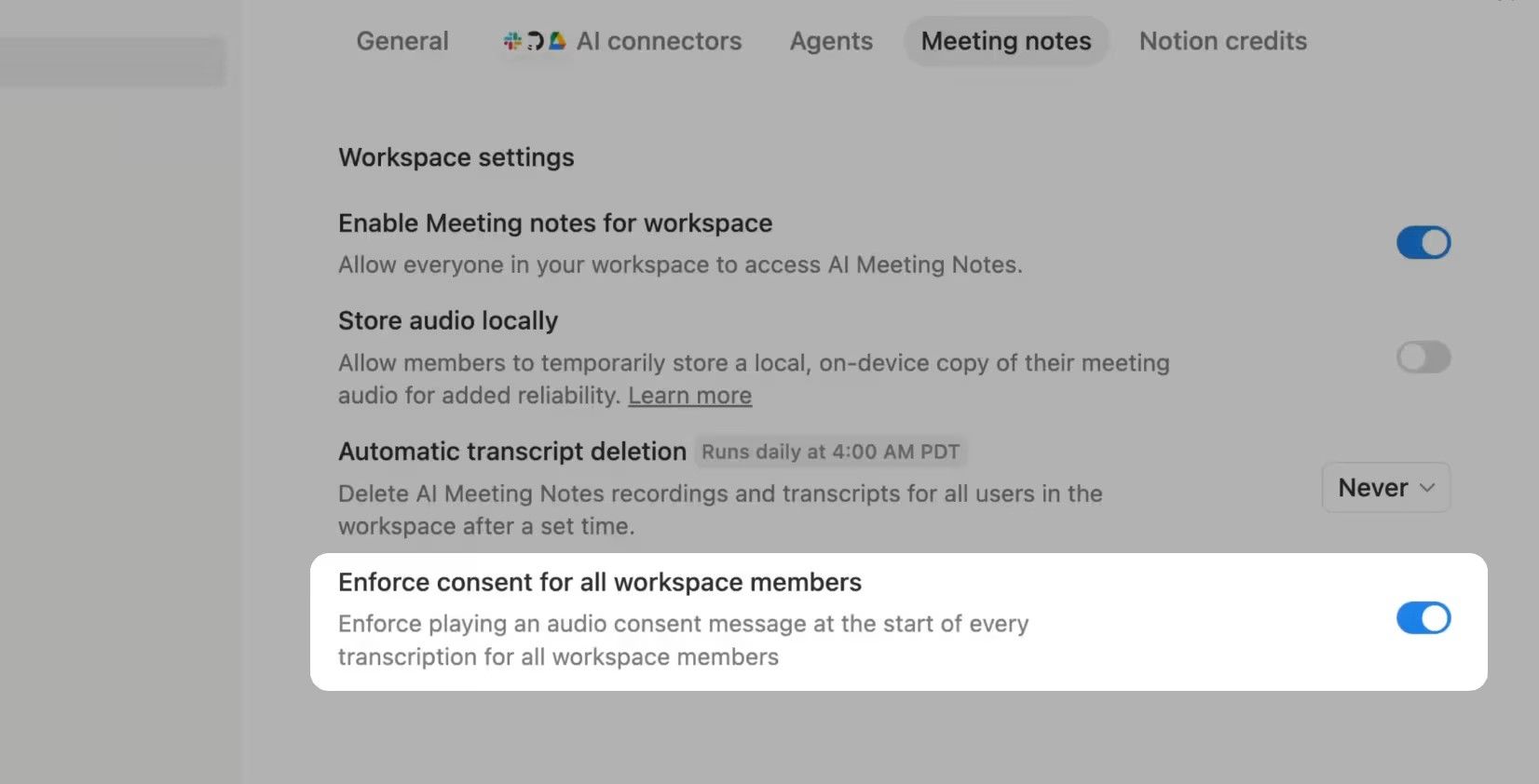
When you turn this on, a consent message will automatically play through your speakers at the start of each transcription to let everyone know the meeting is being recorded by Notion AI.
Admins can lock this in by going to Settings > Notion AI > AI Meeting Notes and checking the "Enforce consent for all workspace members" option.
TEMPLATES THAT JUST WORK

Reset. Refocus. Reorganize. Access premium systems that streamline your work and life.
Templates for freelancers, founders, students & beyond.
From Money Tracker to Second Brain, get systems that just work.
Quick Links & Tools
Custom Skills for Notion AI are Live: Notion is officially rolling out Custom Skills. Write a prompt once, save it as a page, and use it forever by simply tagging it in your AI chat. Because they are just standard Notion pages, you can easily share your best workflows with your entire team.
SyncSpend Expense Tracker is a brilliant iPhone app built by Easlo that logs expenses directly into your Notion database, even automatically when you use Apple Pay. It is a perfect example of a growing trend where creators use Notion as the backend database while building simple, native mobile apps for the frontend interface.
The AI Native Plant Garden Planner for the gardeners out there. You feed Notion AI your location and the plants you already own, and it cross-references your growing zone to recommend native plants that will support local pollinators all year long. Even if you aren’t interested in gardening, it’s a good way too see the capabilities of Notion AI and what the use cases could be.
What did you think about this newsletter? |
Reply